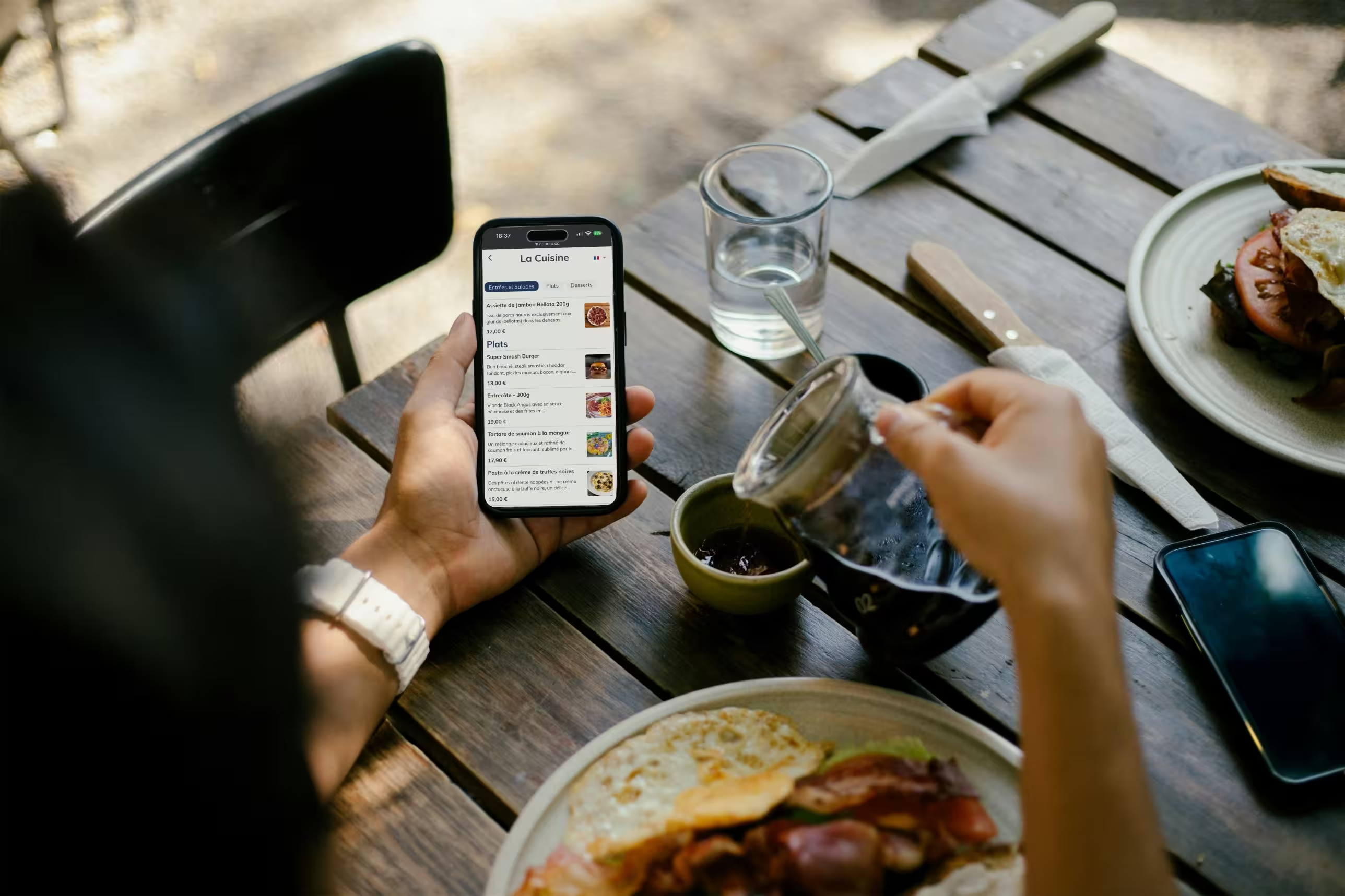
A brasserie runs on a dense menu: draught and bottled beers, wines by the glass, sharing boards, salads, daily specials that depend on deliveries, lunch deals. With a paper menu, every change means a reprint or a pen stroke.
A QR code menu solves this: a complete, always up-to-date menu, right on the guest’s smartphone. Here is how it works, why it fits the brasserie format so well and how to roll it out in your venue.
QR code menus in brasseries: from paper to digital, step by step
Reading time: ~10 min
1. Key takeaways
2. How does a QR code menu work in a brasserie?
3. 4 reasons a QR code menu suits long brasserie menus
4. Which supports should you use to display the QR code?
5. Create your brasserie QR code menu in 5 steps
6. Highlight the right products to sell more
7. 4 mistakes to avoid when you roll it out
8. Use viewing data to fine-tune your menu
9. Conclusion: a QR code menu is a management tool for your brasserie
10. FAQ
Key takeaways
• How it works: guests scan a QR code and browse the menu on their smartphone, with no app. For a brasserie, a dynamic QR code is the only sensible choice.
• Why it works in brasseries: long menus, frequent updates, a varied clientele, recurring printing costs.
• Supports: table tents, beer mats, table stickers, window posters, counter cards, all with a matte finish.
• Setup: 5 steps, from choosing a platform to briefing your team.
• Sales and steering: well-placed suggestions and viewing data to fine-tune your menu.
How does a QR code menu work in a brasserie?
Guests point their phone camera, iPhone or Android, at the QR code on the table or at the bar. Google Lens works too.
A page opens in the browser with the full menu: drinks, dishes, daily specials, allergens. No app to download, no account to create.
Static or dynamic QR code: the difference that matters
A static QR code points to a fixed link, very often a PDF. If the link changes, the code stops working and has to be reprinted. And a PDF is just a scanned paper menu: guests have to zoom, scroll and search.
A dynamic QR code goes through a platform that hosts your menu. The code never changes, but its content can be edited at any time from a back office. For a brasserie whose menu changes every week, it is the only option that holds up over time.
4 reasons a QR code menu suits long brasserie menus
1. A long menu that stays easy to read
A paper brasserie menu easily runs to four pages or more. On a digital menu, guests browse by category: draught beers, bottles, wines by the glass, sharing boards, starters, mains, desserts. They find what they want without flipping pages, and photos showcase each product without weighing down the menu.
2. Updates in seconds
A new keg on tap, a daily special decided in the morning, a happy hour at set times: with a paper menu, every change costs time and money. With a digital menu, you update it from your computer or phone, and guests see the new version at their next scan.
A dish that sells out mid-service can be hidden in one click. Your team no longer has to announce it table by table.
3. A menu foreign guests understand
A brasserie in a city centre or near a station welcomes regulars, groups and tourists. With an automatically translated menu, foreign guests read your dishes in their own language from the same QR code. No need to print several versions. To go further, see our strategy for restaurants in tourist areas.
4. Lower printing costs
Design, printing, lamination, replacing stained or outdated copies: every version of the menu has a cost, and a brasserie often changes its menu several times a year. Between seasonal changes, corrections and worn-out copies, the printing bill can reach several hundred euros a year. With a digital menu, every update is free. The more your menu changes, the more you save.
Which supports should you use to display the QR code in a brasserie?
The support you choose has a direct impact on how often guests scan. Here are the formats that work in brasseries, with their strengths and limits.
Table tent: in the middle of the table or on the terrace. Highly visible, in A5 or A6 format, easy to replace. It can be moved or damaged.
Beer mat: at the bar and on high tables. A natural fit for a brasserie, cheap and easy to brand. The surface is small, so the QR code size needs care.
Table sticker: stuck directly on the table. Discreet, permanent, moisture resistant. A matte finish is a must to avoid glare.
Window poster: at the entrance or in the window. Passers-by can check the menu before they even walk in. Use a large format so it can be scanned from a distance.
Counter card: near the till or the bar, for guests who drink standing up. Lighting varies there, so test the scan on site.
The matte finish is the detail people forget most often. Under dim lighting or direct light, a glossy support creates glare that blocks the scan. For stickers, a matte laminate also stands up to spills and repeated cleaning.
Appero offers QR code holders for restaurants in aluminium, wood or plexiglass, customised in your colours.
Create your brasserie QR code menu in 5 steps
1. Choose a digital menu platform, not just a PDF
There are two kinds of solutions: QR code generators that point to a PDF, and digital menu platforms that host your menu with an editor (categories, photos, prices, allergens). For a menu that keeps changing, the second option is the clear choice: real-time updates, viewing statistics, a menu that reflects your brand.
2. Structure your menu
Order your categories the way guests look for them: draught beers, bottles, wines, cocktails, soft drinks, starters, mains, desserts, set menus. Fill in allergens product by product: it is a legal requirement and a sign of trust.
Add photos of your dishes and signature beers: pictures significantly increase orders for the items they feature. Our article on the impact of photos on sales covers this effect in detail.
3. Generate a QR code in your colours
Go for a dynamic QR code with a clear call to action and a high-definition SVG file for sharp printing on every support. A high error correction level (level H of the ISO/IEC 18004 standard) keeps the code readable even when it is slightly stained or scratched.
4. Test in real conditions
Before equipping the whole room, scan the code on site: evening light, glare, distance, iPhone and Android, loading time on 4G and on Wi-Fi.
5. Roll it out and brief your team
Place the supports on every table, at the bar and in the window. Take five minutes to show the menu to your floor team: they are the ones who will guide hesitant guests.
Good to know: a dynamic QR code never needs reprinting. Prices, daily special, new beer, sold-out item: everything is edited in the interface, and the code on your tables stays the same.
Highlight the right products to sell more
In a brasserie, add-on sales come down to simple moves: a sharing board with a round of pints, a side with the burger, a dessert or a coffee at the end of the meal, an after-dinner drink. In the middle of a rush, servers don’t always have time to suggest them at every table.
A digital menu takes over: a photo of the sharing board in the beer section, a side suggested next to the main, the dessert of the day in the spotlight. Guests discover these products while they choose, with no pressure.
Venues using Appero see on average +8% in sales thanks to suggestions and product highlighting. It is an average, not a guarantee: results depend on your concept, your photos and how your menu is structured. To put it into practice, here are 5 ways to boost add-on sales with a QR code menu and 9 scripts to help your servers increase the average ticket.
4 mistakes to avoid when you roll it out
1. A QR code that is too small or poorly printed
A tiny code, on a glossy background or in colours too close to the background, is hard to scan. Don’t go below 2.5 cm per side, and aim for 3 to 4 cm on a table tent. Strong contrast, ideally black on white, and a matte finish solve most problems.
2. No call to action
Some guests, especially older ones or tourists, don’t immediately understand that they need to scan. A short line under the code, such as “Scan to see the menu”, with a smartphone icon, clears up any doubt.
3. A digital menu that isn’t kept up to date
If nobody updates the menu, guests pick a daily special that has already sold out or a beer that is no longer on tap, and your server takes the disappointment. Set a simple routine: a quick menu check every morning before service, and a product hidden as soon as it runs out.
4. Getting rid of every paper menu
Flat battery, no smartphone, or simply a wish to flip through pages: keep a few paper menus on hand for these guests. QR codes and paper work fine side by side, and this is how most venues using Appero operate. We cover this choice in our article on the pros and cons of digital menus.
Use viewing data to fine-tune your menu
A paper menu tells you nothing. A digital menu shows you what your guests look at. With Appero, you track the number of menu users, views per product, where your visitors come from and clicks to your social media.
Cross-checked with your till sales, this data reveals a beer that gets lots of views but few orders, or a profitable sharing board nobody notices. You can then decide which products to move up the menu, which suggestions to show first and how to order your categories. That is the foundation of menu engineering, based on real behaviour rather than gut feeling.
Appero supports brasseries from setting up the menu to food photography. You can try Appero for free in your venue.
Conclusion: a QR code menu is a management tool for your brasserie
A long and changing menu, a varied clientele, printing costs that come back every season: a QR code menu answers constraints that are specific to the brasserie format.
Choose a dynamic solution, take care of your supports, set an update routine and keep a few paper menus. Your menu then becomes a tool that helps you sell and manage your margins, not just a document to print.
FAQ
Does a QR code menu work without an internet connection?
No. The menu is hosted online, so guests need mobile data or Wi-Fi to load it. In a brasserie, free Wi-Fi with the network name displayed on the tables prevents most issues, especially in basement rooms or areas with poor coverage.
Do guests need an app to scan the QR code menu?
No. Recent iPhone and Android smartphones read QR codes directly with the camera. Google Lens works too. Guests have nothing to install.
How do you handle sold-out items on a brasserie QR code menu?
From the admin interface, an unavailable product can be hidden in seconds, even from your phone in the middle of service. This is especially useful for daily specials and draught beers whose availability changes during the evening.
Is a QR code menu GDPR compliant?
It depends on the provider. A view-only menu with no forms and no account creation raises few issues. If the platform measures menu traffic, check that it complies with the GDPR and that a clear privacy policy is available.
Can a brasserie use a free QR code menu?
Free options exist, usually a static QR code linking to a PDF. They remain limited: hard to read on a smartphone, no statistics, no product highlighting. For a brasserie whose menu changes often, a digital menu subscription quickly pays for itself through printing savings and add-on sales.
How do you display allergens on a brasserie QR code menu?
When you build the menu, you tag each product with the allergens it contains. The information appears on the product page the guest views. In the EU, the INCO regulation requires restaurants to inform guests about the 14 major allergens in the dishes they serve, and a digital menu is a simple way to do it in writing.