Your allergic customer scans the QR code on the table. What must they find there for you to be compliant?
Since 1 July 2015, restaurants in France must inform customers in writing about the allergens in their dishes. Digital formats are allowed, but the QR code is not the whole story: what matters is the information behind it. Here is what the law requires, what is simply good practice, and how to keep it all up to date without reprinting.
Reading time: about 8 minutes
1. What is the legal framework for allergen information in restaurants?
2. Which 14 allergens must be displayed?
3. Digital menu and allergens: the conditions to be compliant
4. Dish by dish or general table: which approach to choose?
5. How do you keep allergens up to date on a digital menu?
6. Best practices for a readable, compliant digital menu
7. What does a restaurateur risk in case of non-compliance?
8. Checklist: is your digital menu compliant?
9. Frequently asked questions about allergens and digital menus
What is the legal framework for allergen information in restaurants?
The reference texts
Two texts set the rules. Regulation (EU) No 1169/2011, known in France as the INCO regulation, requires allergen information for all foodstuffs, including those served in restaurants. In France, Decree No. 2015-447 of 17 April 2015 sets out how this applies to non-prepackaged food. It has been in force since 1 July 2015.
What the decree requires in practice
The information must be written, readable and visible from the places open to the public. The restaurateur has two options:
- display the information itself, for example on the menu;
- state in writing where to find it, provided the customer can access it directly and freely, in written form.
No single format is imposed: chalkboard, binder, menu or digital format. The official guide on service-public.fr explains the details.
Your suppliers must give you the information
The decree provides that every delivery to a catering business must come with a document listing the allergens. Ask for it: it is the basis of your recipe sheets.
Who carries out inspections?
The DGCCRF, the French consumer protection authority, checks allergen information in restaurants through its local departments.
Which 14 allergens must be displayed?
The list in Annex II of the INCO regulation
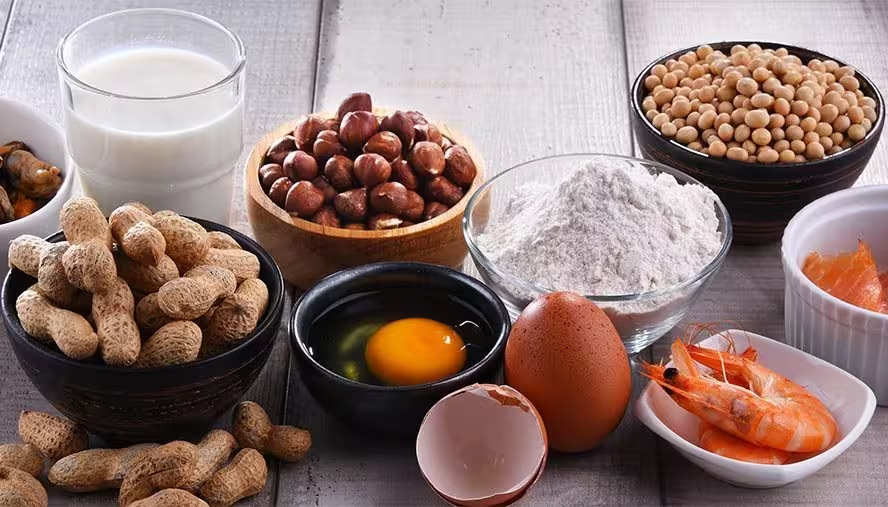
Every dish served must flag the presence of these 14 allergens, or their derivatives:
- cereals containing gluten (wheat, rye, barley, oats, spelt, kamut)
- crustaceans
- eggs
- fish
- peanuts
- soy
- milk, including lactose
- tree nuts (almonds, hazelnuts, walnuts, cashews, pecans, Brazil nuts, pistachios, macadamia nuts)
- celery
- mustard
- sesame seeds
- sulphur dioxide and sulphites, above 10 mg/kg or 10 mg/L
- lupin
- molluscs
The list is closed, but its scope is wide: starters, mains, desserts, sauces, sides, daily specials, kids' menus, takeaway dishes and drinks.
Hidden allergens
They sit in industrial sauces, stocks, kitchen bases and sides. Each recipe sheet must therefore list every ingredient, supplier bases included. Naming the specific cereal or nut also helps customers. The quality of what you display depends on this rigour, whatever the format.
Remember: purely verbal information is not enough. The customer must not have to ask staff to get access to the written information.
Digital menu and allergens: the conditions to be compliant
What the law accepts
The law does not define a mandatory format. A digital menu viewed on a smartphone through a QR code is therefore allowed, under four conditions:
- The information is written. Pictograms alone are not enough, you need a text label.
- It is readable on mobile. No unreadable PDF, no tiny font at the bottom of the page.
- The customer accesses it directly and freely. In practice, this rules out creating an account or downloading an app.
- The customer knows where to find it. A clear note on the table or menu, such as "Allergens: scan the QR code", does the job.
The QR code is only an access point. It leads to a menu that must itself contain the data. You will find QR code supports for restaurants suited to every type of venue.
Plan for customers with no network or no battery
A dead phone or a weak connection happens. Keep an up-to-date paper backup, such as a binder or a printed sheet, and tell your staff where it is. Many restaurants also keep a paper menu for the atmosphere and use the QR code menu for the allergen details.
Dish by dish or general table: which approach to choose?
Both are allowed. The double-entry table (dishes in rows, 14 allergens in columns) is the classic format. On a smartphone, it quickly becomes unreadable. Displaying allergens on each dish sheet is easier to read, and it avoids oversights when a dish changes: you only edit the sheet concerned.
- General table: allowed if the link with each dish is explicit. Average readability on mobile, risk of oversight when a dish changes.
- Allergens on each dish sheet: allowed. High readability, the information sits directly under the dish, and updates are targeted on the dish that changed.
- Dish sheet with icons and text label: allowed, the text remains essential. Very high readability, visual and text, immediate update from the admin interface.
In a digital menu, each sheet can show allergens as icons, with an explicit mention such as "contains: milk, eggs, gluten". The visual catches the eye, the text ensures compliance.
How do you keep allergens up to date on a digital menu?
A supplier change, a modified recipe, a daily special: the composition can change from one day to the next. On paper, you have to reprint or correct by hand. On a digital menu, the change is live immediately, with no reprinting.
To make this reliable, rely on structured recipe sheets, where each ingredient is recorded with its supplier and allergens. Also document an update procedure in your food safety plan: who updates, how often it is checked, how changes are tracked.
At Appero, the 14 regulatory allergens are already in the admin area. You assign them to each product and the sheet updates for your customers, with no technical intervention. You can also schedule the display of a product, a category or a section, handy for a daily special that only exists for one service.
Good to know: if the network or the online menu goes down, the information obligation still applies in full. Hence the paper backup.
Best practices for a readable, compliant digital menu
A well-designed digital menu makes allergen information more visible than a paper table nobody reads. A few habits help:
- Dish by dish. Allergens appear on each dish, with an explicit mention.
- Icons plus text. Pictograms are not standardised. They help, but the text label is essential.
- Sauces, sides and extras treated like dishes. They hold a good share of hidden allergens.
- Kids' menu checked separately. Recipes often differ from the adult ones, and parents pay close attention.
- An allergen filter, if your tool offers one. It helps customers rule out dishes, but it does not replace the display on each sheet.
- A language the customer understands. At Appero, the menu is shown in the language of the customer's phone, and they can change it themselves, a real plus for international guests.
To go further, see how data-driven menu engineering fits with your digital menu, or the impact of food photos on sales.
What does a restaurateur risk in case of non-compliance?
The DGCCRF runs regular checks, often during themed campaigns. A breach can lead to a warning, a formal notice or a fine. Industry sources mention up to €1,500 for an individual and €7,500 for a company, which should be read as an order of magnitude.
The heaviest risk lies elsewhere. If an allergic customer is put at risk by missing or wrong information, the restaurateur's civil and criminal liability may be engaged. For reputation, unclear allergen information worries customers and shows up in online reviews. Conversely, clearly displayed allergens signal professionalism.
Checklist: is your digital menu compliant?
- The 14 allergens are filled in for every dish, drinks included.
- Icons are always paired with a text label.
- A visible note says where to find the information ("scan the QR code").
- Customers have no account to create and no app to install.
- The menu is readable on a smartphone, no zooming needed.
- An up-to-date paper backup is ready.
- Your recipe sheets and supplier document are up to date, and someone owns the updates.
A well-configured digital menu ticks all these boxes, and saves you time at every menu change.
Frequently asked questions about allergens and digital menus
Is a waiter telling customers about allergens out loud enough?
No. Decree No. 2015-447 requires written information. Verbal information can complement it, not replace it.
Do daily specials and suggestions need allergen information?
Yes. The obligation covers all food served, including daily suggestions, appetisers, buffets and takeaway dishes. No preparation is excluded.
Do drinks also need allergen information?
Yes. The rule covers all food and drink served: sulphites in wine, milk or egg in a cocktail, for example. Fill them in on each drink's sheet, as you would for a dish.
Must my supplier give me the allergen information?
Yes. Every delivery to a catering business must come with a document listing the allergens. Keep it and use it for your recipe sheets.
Does an allergen filter replace the display on each dish sheet?
No. The filter helps navigation, but dish-by-dish display is what ensures compliance. The two complement each other.
Does the regulation require a specific format for allergen icons?
No, no standardised pictogram is imposed. Icons are a visual aid and must always come with a clear text label.
How long should recipe sheets and allergen data be kept?
No duration is set for commercial catering. As good practice, keep them as long as the recipe is in use, and archive older versions when a recipe changes.
Is a QR code digital menu accepted during a DGCCRF inspection?
Yes, if access is direct, with no account or app, and if the data is complete, readable on mobile and up to date. The QR code is an accepted access point, not a guarantee of compliance in itself.